 HomeBudget
Family money gets messy. HomeBudget keeps it simple.
Most households run on memory, scattered messages and a month-end guess. That is where the stress starts.
Set it up in minutes, then it runs itself
Everything a household needs, in one app
Built for how Indian and global families really manage money: one person runs the budget, everyone else adds their own spending.
Budget Manager and Family Member modes
The manager sees the full picture. Each family member has their own named profile, keeps their own spending and shares it with a tap.
Income, budget and allowances
Add salary, pension, rent and other income, set what each person can spend, and see what is still available.
Monthly commitments and planned expenses
EMIs, rent and bills that repeat every month, with due dates and a paid tracker. Plus planned expenses such as school fees, insurance or an EB bill, with a forecast of the cash you will need in the coming months.
Reminders that actually reach you
Phone notifications at the time you choose, before every EMI and bill, and daily until an overdue bill is marked paid. Plus a floating bell with the cash to keep in each bank.
Bank-wise balance
See how much to keep in each bank account, and by which date, so no payment bounces.
Clear reports
Category charts, daily average and top category for any date range. Export to Excel or Google Sheets, or keep a full data file. Fold any card away to keep long pages short.
Share nearby, by Bluetooth
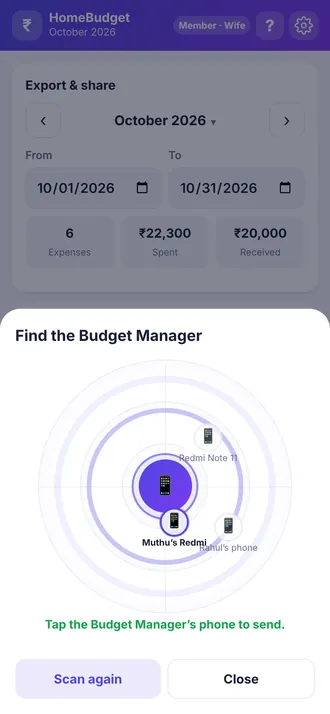
A radar finds the Budget Manager's phone and sends expenses straight across, no chat app and no internet. Or send one WhatsApp message with an import code. Nothing goes through our servers.
App lock and encryption
Optional passcode with AES-256 encryption, auto-lock, and screenshots blocked when you want. Forgotten passcodes cannot be recovered, by design.
Backups you will not forget
Back up everything to a file named by date and send it to yourself. A free reminder, monthly or weekly at the time you choose, opens the backup screen when you tap it. Erasing everything needs two confirmations and a press-and-hold.
Your Home, your order
A savings summary on top, then rows you can drag into your own order. Fold the cards you do not need, and load long lists 50 at a time.
A tour on every screen
Tap the ? button for a short guided tour of the page you are on, or of the whole app. It points at each widget and says what it is for.
Speaks your language
Use it in the language your family is comfortable with, with light and dark themes.
Simple, clear screens
Sample figures shown. Your own data never leaves your phone.
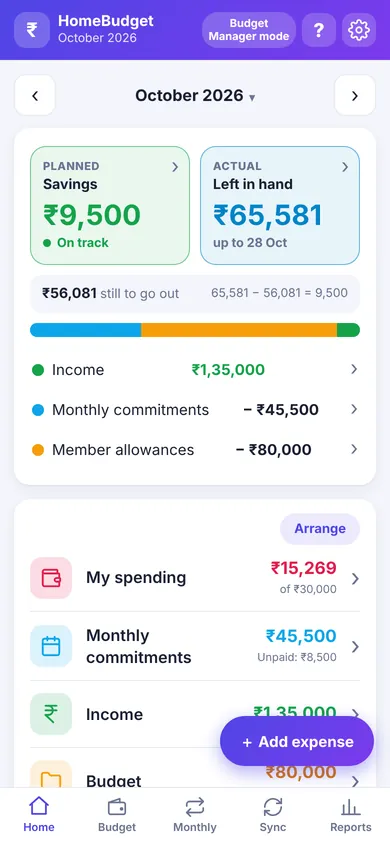
HomePlanned savings against what is left in hand, then your spending, commitments and income.
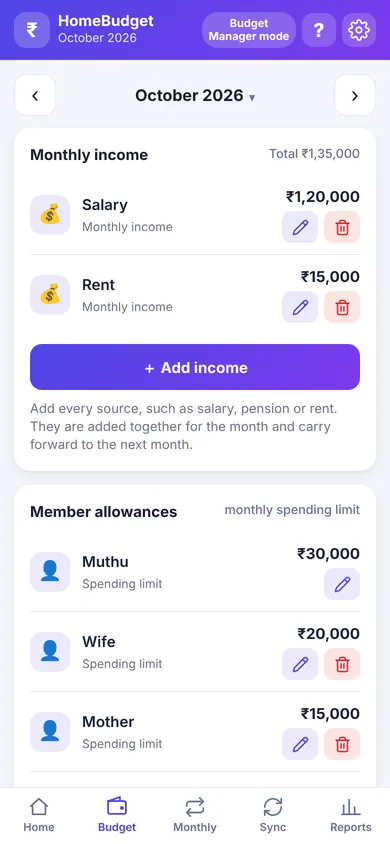
BudgetIncome sources and a limit for every family member.
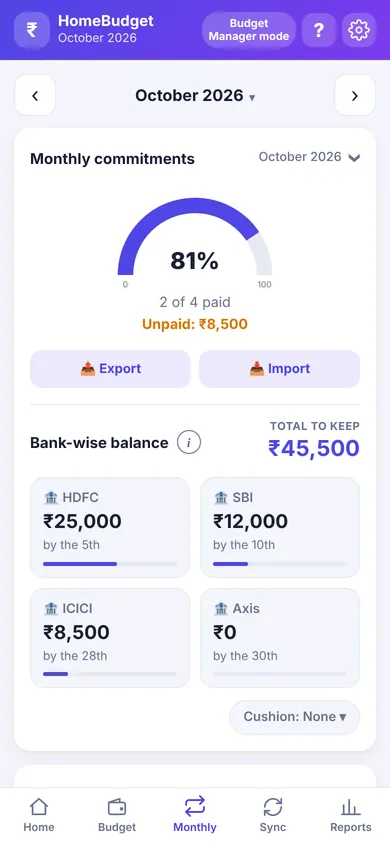
MonthlyCommitments paid and due, and what to keep in each bank.
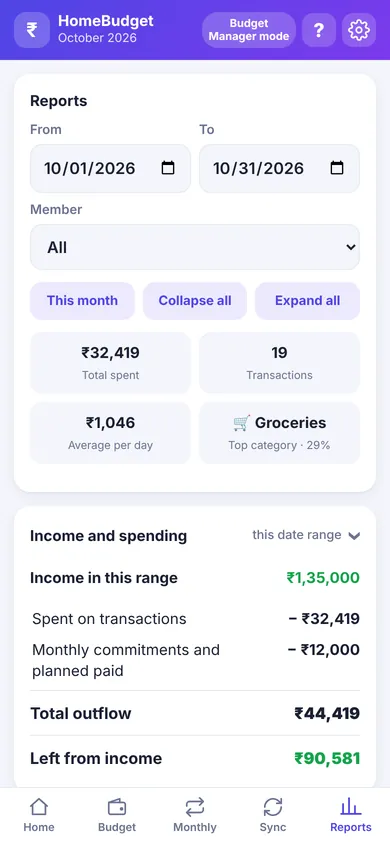
ReportsCharts for any date range, ready to export.
Send expenses across the room, on a radar
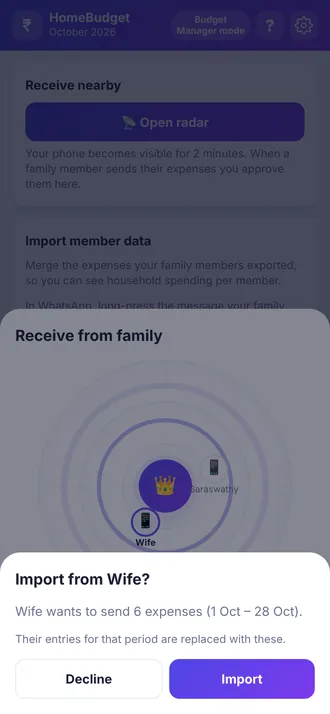
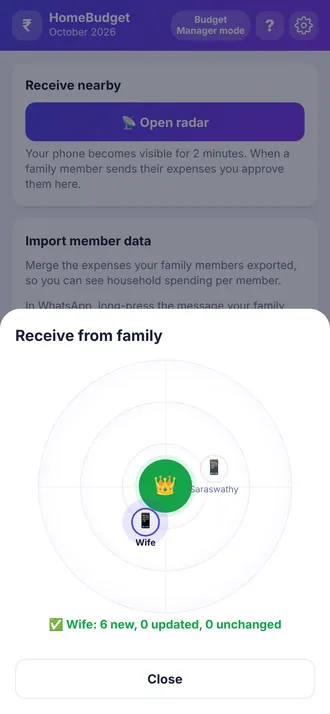
Family members tap Find the Budget Manager. A radar scans and the manager's phone lights up. Tap it, and the expenses travel over Bluetooth.
- No internet, no sign-in, no chat app
- The manager always approves before anything is imported
- Encrypted by Android's own pairing
- Prefer chat? One WhatsApp message with an import code works too
See HomeBudget in action
A quick tour in English or Tamil. Pick the one you prefer.
முழு விளக்கம்
வருமானம், பில்கள் முதல் அறிக்கைகள், தனியுரிமை வரை ஆப் எப்படி வேலை செய்கிறது.
சுருக்கமாக
ஒரு நிமிடத்தில் முழு யோசனை, உங்கள் போனுக்கு ஏற்றது.
Videos load from YouTube only when you press play. Until then, this page contacts no one.
Learn it at your own pace
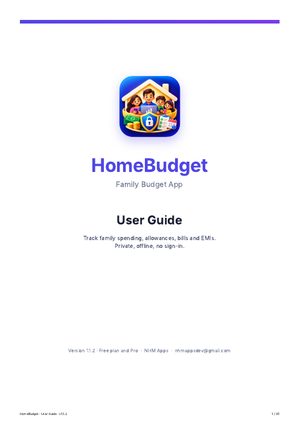
A step-by-step guide with screenshots. Keep it open while you set up your family budget.
HomeBudget User Guide
Everything from first setup to reports, backups and Pro, in plain language.
- Budget Manager and Family Member modes
- Income, allowances, monthly commitments, planned expenses and reminders
- Share nearby by Bluetooth, backup and backup reminder, app lock, the "?" tour and the Free and Pro plans
Start free. Unlock everything once.
No subscription, no ads, no renewals. Pro is a single one-time purchase through Google Play, and it works on every phone signed in to the same Google account.
Free
Everything you need to try it with your family
- Up to 3 people in the budget
- Up to 5 monthly commitments
- Up to 3 planned expenses
- This month and the previous month
- Phone reminders and Bluetooth sharing
- Basic reports and data export
- Backup with a reminder, shared as a file
- Guided tour of every screen
Pro
No limits, plus extra tools
- Unlimited people, commitments and planned expenses
- Full history, every month
- Restore from backup, to move to a new phone
- App lock and encrypted data
- Bank-wise balance
- Extra report charts, by member and over time
- Move the reminder and forecast buttons anywhere
Your data is never deleted if you go over a free limit. Final plan details are shown in the app and on Google Play.
Built differently, on purpose
Many budgeting apps live on someone else's server. HomeBudget lives on your phone.
| HomeBudget | Many budgeting apps | |
|---|---|---|
| Account or sign-in | Not needed | Usually required |
| Works offline | Fully | Often needs internet |
| Ads | None | Common in free versions |
| Where your data lives | Only on your phone | Often on the company's servers |
| Whole family in one budget | Manager plus named members, share by Bluetooth or message | Often one person, or a paid family plan |
| EMI and bill safety | Reminders and a bank-wise cash guide | Not always included |
| Cost | Free, with a one-time Pro unlock | Often a monthly subscription |
Households that run on EMIs, allowances and one careful planner
Joint and extended families
One person plans the budget while parents, spouse and children track what they spend.
Home, car and personal loan borrowers
Know each EMI date and how much to keep in which bank, so nothing bounces.
Privacy-minded people
No bank login, no account and no cloud. Just a budget app that stays out of your business.
Available in 10 languages
Quick answers
Is my data really private?
Yes. Everything you enter is saved only on your phone. There is no account, no analytics and no ads. Data leaves your phone only when you choose to share it. You can also lock the app with a passcode and encryption (Pro).
Do I need internet?
No. HomeBudget works fully offline. Google Play is used only to install the app and to handle the optional Pro purchase.
How much does it cost?
It is free to start. Pro is a one-time purchase through Google Play, with no subscription. The price is shown in the app and on Google Play.
How do family members send me their expenses?
Either over Bluetooth with the Share nearby radar, or as one WhatsApp message with an import code. You approve before anything is imported, and each person appears under their own name.
Will I get reminders when the app is closed?
Yes. Switch on phone notifications in Settings and pick the time. On Xiaomi, Redmi and a few other phones, also turn on Autostart for HomeBudget; the app has a button that takes you there.
Can two phones share one budget live?
Not automatically, by design: that would need a server. Each phone keeps its own data and members send their entries when they choose.
What if I change my phone?
Make a backup in Settings and share the file to yourself (WhatsApp, Gmail or Drive), then choose it on the new phone with Restore from backup. Restore is part of Pro; backing up is always free. HomeBudget can also remind you to back up every month or week.
Which phones does it run on?
HomeBudget is an Android app. It is coming soon to Google Play.
Ready to know where the money goes?
HomeBudget is coming soon to Google Play. Free to start, private by design.
Coming soon to Google Play